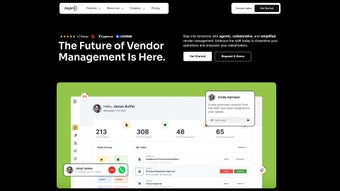

Download ZAPRO – AI Procurement Software, Spend Management, Automation
Overview: Why ZAPRO Is the Next‑Generation Procurement Tool
In today’s fast‑moving business climate, procurement teams are forced to balance cost reduction, compliance, and speed. ZAPRO answers this challenge with an AI‑driven, cloud‑native platform that unifies spend management, contract administration, and accounts‑payable automation under a single dashboard. The solution leverages machine‑learning models to analyze historic spend, suggest optimal suppliers, flag non‑compliant contracts, and surface hidden savings—all without the need for spreadsheets.
Users can create purchase requests, generate purchase orders, and track approvals in real time. The AI engine continuously learns from each transaction, improving supplier recommendations and automatically calculating potential cost avoidance. This proactive insight reduces manual effort and frees professionals to focus on strategic sourcing and risk management.
On the AP side, ZAPRO incorporates OCR‑based invoice capture, three‑way matching, and tolerance checks that dramatically cut invoice‑processing time and eliminate duplicate payments. Pre‑built connectors for NetSuite, QuickBooks, SAP, and other leading ERPs keep financial data synchronized, eliminating duplicate entry and ensuring data integrity across systems.
Across manufacturing, retail, and professional services, customers report a 30‑40 % reduction in purchase‑order cycle time, a 20 % boost in spend visibility, and a 15 % increase in negotiated discounts. For organizations seeking a secure, AI‑enhanced procurement solution that scales globally, ZAPRO offers a compelling blend of automation, analytics, and compliance.
Core Features That Differentiate ZAPRO
- AI‑Powered Supplier Selection: Analyzes spend history, performance metrics, and market pricing to recommend the most cost‑effective vendors.
- Automated Purchase Request & Order Workflow: Single‑screen creation, approval routing, and real‑time status alerts.
- Contract Management with Renewal Alerts: Central repository, AI‑driven clause extraction, and proactive renewal notifications.
- Spend Analytics & Real‑Time Dashboards: Interactive visualizations by category, department, and supplier.
- AP Automation with OCR & 3‑Way Matching: Scans invoices, matches them to POs and receipts, and flags discrepancies.
- Dynamic Savings Tracker: Captures negotiated discounts, rebates, and cost‑avoidance for clear ROI reporting.
- Native ERP & Accounting Integrations: Connectors for NetSuite, QuickBooks, SAP, Oracle, and Microsoft Dynamics.
- Compliance & Immutable Audit Trail: Full logging to support SOX, GDPR, and internal audit requirements.
- Mobile Apps & Push Notifications: iOS and Android clients for on‑the‑go approvals.
- Scalable Multi‑Tenant Architecture: Cloud infrastructure that supports teams from small departments to enterprise‑wide deployments.
Each feature is engineered to cut manual steps and improve data accuracy. For example, the OCR engine achieves over 95 % accuracy on varied invoice layouts, while the AI recommendation engine refines its suggestions based on user feedback, creating a self‑optimizing sourcing loop. Role‑based security ensures that only authorized personnel can view or edit sensitive contracts, meeting strict compliance standards.
The real power of ZAPRO lies in its end‑to‑end flow: a purchase request automatically pulls relevant contract terms, suggests preferred suppliers, and estimates savings before approval. Once approved, a purchase order syncs with the ERP, and incoming invoices are instantly matched and validated. This seamless integration eliminates siloed processes and aligns finance, operations, and strategic sourcing on a single platform.
Installation, Daily Use & Compatibility
Step‑by‑Step Installation Guide
- Create an Account: Visit ZAPRO’s website, start a free trial, enter a corporate email, set a strong password, and verify the account.
- Select Deployment: Choose SaaS (cloud‑hosted, auto‑updated) or on‑premise Docker deployment for tighter control.
- Configure ERP Integration: In the admin console, pick your ERP, enter API credentials, map fields, and run a test sync.
- Set Up Users & Roles: Define roles (Requester, Approver, Analyst) and enable SSO via LDAP or Azure AD.
- Import Historical Data: Upload past purchase orders, contracts, and invoices as CSV; the AI auto‑tags and categorizes them.
- Activate AI Modules: Turn on Supplier Recommendation and Savings Tracker; the engine begins learning within 24‑48 hours.
Typical Daily Workflow
- Request Creation: Users launch “New Purchase Request,” attach documents, and receive AI‑driven supplier suggestions.
- Approval Routing: The request follows predefined approval matrices, with push notifications to mobile devices.
- Order Generation: Approved requests become purchase orders, sync automatically with the ERP, and are emailed to suppliers.
- Invoice Processing: Invoices are captured via email, portal, or OCR scanner, matched to PO and receipt data, and flagged for exceptions.
- Payment Execution & Audit: Matched invoices move to the payment queue, and every action is logged for audit purposes.
- Analytics Review: Procurement analysts monitor spend trends, supplier performance, and realized savings on the dashboard.
Compatibility and System Requirements
ZAPRO runs on any modern browser and supports Windows 10/11, macOS Catalina+, Linux, iOS 13+, and Android 8+. For on‑premise setups the minimum server specs are a 4‑core Xeon/EPYC CPU, 16 GB RAM (32 GB recommended), 200 GB SSD, Docker 20.10+, and optional Kubernetes 1.21+.
Security certifications include ISO 27001, SOC 2 Type II, and GDPR compliance. Data is encrypted at rest (AES‑256) and in transit (TLS 1.3). Multi‑factor authentication and granular RBAC protect sensitive procurement data.
Pros, Cons, FAQ & Conclusion
Pros
- AI‑driven supplier recommendations cut sourcing time by up to 40 %.
- Full AP automation with OCR and three‑way matching eliminates manual invoice entry.
- Robust ERP integrations keep financial data synchronized automatically.
- Real‑time spend analytics provide clear visibility into savings opportunities.
- Secure, cloud‑native architecture meets enterprise compliance standards.
Cons
- Initial AI training (24‑48 hours) may delay immediate insight.
- On‑premise Docker/Kubernetes deployment requires dedicated IT resources.
- Advanced workflow customization may need professional services.
FAQ – Common Questions
-
Is ZAPRO available as a free trial?
Yes. ZAPRO offers a 30‑day free trial with full feature access, so you can evaluate its AI procurement capabilities risk‑free.
-
Can ZAPRO handle multiple currencies and tax regimes?
Absolutely. The platform supports over 150 currencies and configurable tax rules for VAT, GST, and local sales taxes.
-
How does ZAPRO ensure data security?
Data is encrypted at rest (AES‑256) and in transit (TLS 1.3). ZAPRO complies with ISO 27001, SOC 2 Type II, and GDPR, and offers MFA and RBAC.
-
What ERP systems can ZAPRO integrate with?
Native connectors exist for NetSuite, QuickBooks, SAP S/4HANA, Oracle ERP Cloud, Microsoft Dynamics 365, and more via API.
-
Is there a mobile app for on‑the‑go approvals?
Yes. ZAPRO provides native iOS and Android apps with push notifications, request creation, and approval actions.
Conclusion & Call to Action
ZAPRO delivers a powerful mix of AI‑driven procurement intelligence, end‑to‑end automation, and deep ERP integration, making it an attractive option for businesses that want to modernize spend management. While the AI learning curve and advanced customization may require an upfront investment, the measurable ROI—lower operational costs, faster cycle times, and stronger compliance—justifies the effort.
Download ZAPRO today to start your free 30‑day trial, empower your procurement team with AI, and unlock hidden savings across the organization. For enterprise‑grade deployments, contact ZAPRO’s sales team to discuss tailored pricing and migration services.






